

How to Use Quantity Breaks in Your Shopify Store to Increase Sales - case study included
Shopify merchants are always looking for ways to increase average order value, move inventory faster, and offer better deals without creating extra work and complexity. That is exactly why we added Quantity Breaks into the Bundler – Product Bundles app.
This feature lets you apply tiered pricing for single products, helping you increase sales by encouraging customers to buy more. In this article, we’ll try to explain to you what quantity breaks are, why they work, and how to set them up in your Shopify store. We also included practical examples of how one Shopify merchant used them to increase revenue.
What Are Quantity Breaks in Shopify
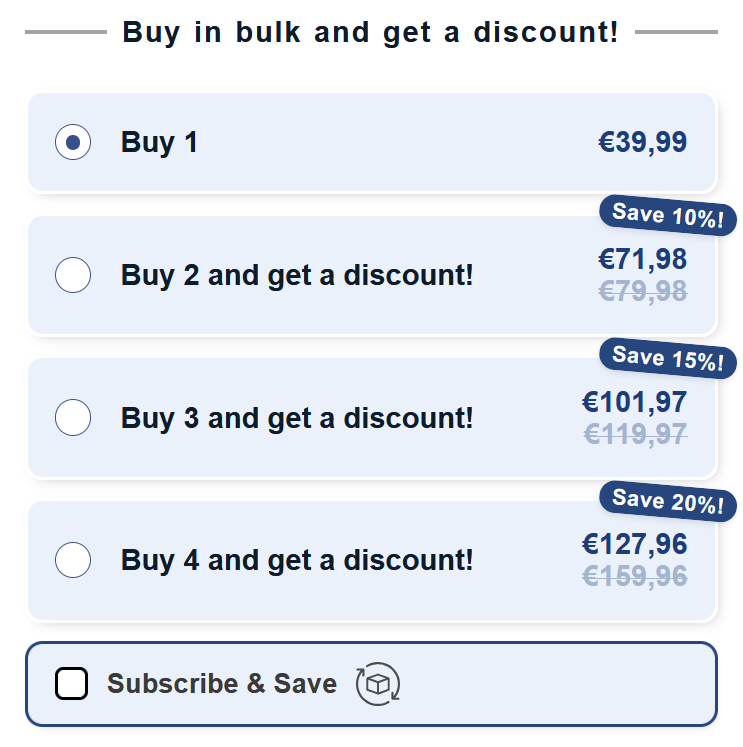
Quantity Breaks let you show different prices depending on how many units of the same product a customer buys. The more they purchase, the better the price per one unit.
Instead of hidden discounts or manual calculations, customers see clear, clickable options directly on the product page. The deal is visible, easy to understand, and simple to use.
This is one of the most effective ways to encourage larger orders without changing your product or checkout flow. Customers do not need to enter codes and you don’t need aggressive sales practices..
Why Quantity Breaks Help Shopify Stores Sell More
1. Increase Average Order Value Naturally
Quantity Breaks give customers a clear reason to buy more of the same item. When customers see that the price per unit drops with multiplying the items, they are more likely to increase their order.
2. You Set Up The Discount Strategy
With Bundler, you can decide how each pricing tier works. You can use set prices or percentage discounts.
Flexibility helps you align pricing with your product strategy and profit margins.
3. Clear Inventory Faster
If you have products that are not selling so well, use quantity-based discounts to encourage larger purchases. Instead of discounting everything in your Shopify store, you can apply deals on specific products that are harder to sell which means better inventory turnover.
4. Improve the Shopping Experience (Product Page)
The Quantity Breaks option appears directly on the product page next to the add to cart button. Customers can easily compare pricing immediately and choose the one that fits them best.
You don’t need to work on explanations. The design is clean, mobile-friendly, and simple to navigate.
5. Combine With Subscriptions and Loyalty
The feature also works with Seal Subscriptions, so customers can subscribe to larger quantities with better rates. If you also have a loyalty program, you can combine Quantity Breaks with loyalty points to reward high-volume customers, this can also be done in combination with Seal Loyalty.
How to Set Up Quantity Breaks in Bundler App
Setting up only takes few minutes and you don’t need any coding:
- Open your Bundler dashboard
- Click Create Bundle and select Quantity Break
- Choose your quantity tiers
- Add your prices or discounts
- Preview and publish
CASE STUDY
Shopify Dog Food Store Increases Revenue With Quantity Break
Client:
A Shopify merchant selling premium dog food and supplements. Customers are buying single items or subscribing monthly.
Challenge:
Most were purchasing just one bag per order, even though dog food is something they need weekly or monthly. The merchant wanted to increase order size without running constant promotions or adding complex upsells.
Goals:
- Increase average order value
- Clear slow-moving items
- Encourage bulk purchasing
- Avoid discounting everything in store
Solution:
The merchant activated Bundler’s Quantity Breaks to offer visible discounts when customers purchased higher quantities of the same product. Instead of showing volume pricing, the merchant displayed clearly labeled options like:
- 1 Bag – $25
- 3 Bags – $67.50 (Save 10%)
- 6 Bags – $120 (Save 20%)
Each option was shown directly on the product page in clear format so customers could instantly see the savings and choose the option that was the best for them.
40 Days Testing Results
+23% Revenue Increase
Total revenue was increased due to larger order sizes from repeat customers and first-time buyers.
+18% Increased Average Order Value
More customers chose the 3-bag or 6-bag options, even if this was their first purchase.
Better Customer Retention
Subscribers who bought larger quantity packs stayed subscribed longer, with fewer skipped months.
Why It Worked
- Savings Were Super Clear
Showing the savings next to each option helped customers understand the value of buying more. Instead of doing math, they simply picked the option that made sense. - It Matched the Product Usage
Dog food is for sure a weekly or monthly need. Customers already knew they’d come back for more. Quantity Breaks gave them a reason to buy more immediately, especially with subscription compatibility via Seal Subscriptions. - It Required No Extra Work
The merchant set up Quantity Breaks inside Bundler in minutes. No coding, no extra apps, no changes to their theme.
Final Thoughts. Should You Use Quantity Breaks?
If you want to increase average order value, move stock faster, or create more attractive product pages, Quantity Breaks is one of the simplest features to do that.
They work especially well during high-traffic seasons like Black Friday and Cyber Monday. But they are just as effective year-round for health products, skincare, supplements, apparel, and any product customers might buy in multiples.
This feature is now available in the Bundler – Product Bundles app. Set it up today in no time and give your customers more reasons to buy more.
We hope this article helps you to grow your business! :)